A Social Twist | How To Use Page
|
|||
|
|
How to Use this Site
Welcome to our Social Media with a Twist! In your User feed, you can Edit your Profile and Manage Posts. Manage Posts lets you Hide posts in your feed, that you may not want other user to see if they visit your User feed. Simply select the posts that you want to hide and click "Hide Selected Posts". You can click on Hidden Posts to see your hidden posts and similarly, select the posts that you want to un-hide. Hidden posts are only hidden from your User feed. Each post in your feed has 3 dots to the right of your user name. Those allow you to edit or delete that post. If you delete the post, it will be completely deleted from the site. The Home Page has 3 sections: On the left, is your icon and user name. Below that is a Text Box, that when clicked on "What's on your mind" opens up a Posting dialog box. In that Posting box, you can post Text (a caption) and Photos or Videos, or just text. Text is limited to 5000 characters. All the line feeds that you post in the caption, will show as line feed in your post. There is an emojis button for you to add emojis to your post.
NEW FEATURE!
Below the text box, is an option to add a link, and the link text.
This link text will show just under your Icon in you post, in larger text.
NOTE: You can also put links in the text box without the URL. You would put the link as
Click Here to visitr my site: mysite.com/some_file.html That link will be clickable to whatever site you entered. 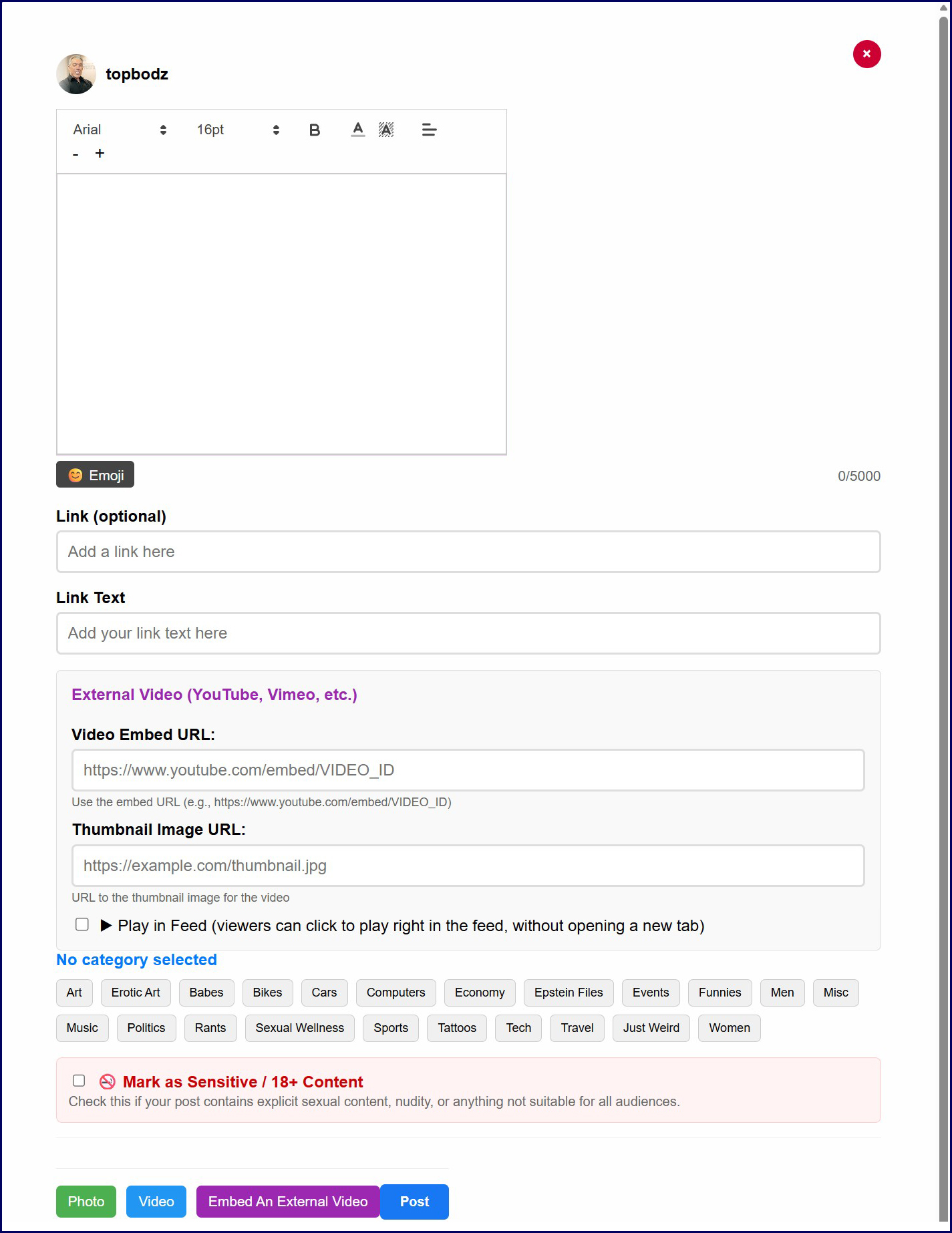

Since we have many different topics, it is important to post your photos/videos in the appropriate category, so that user will see them when they visit the associated topic. You MUST select a category for your post. If no category fit your post, you can use Misc. After selecting a category, click on Photo or Video, this will open a dialog to pick a file from your computer. In the image preview section, (after you've selected a photo or video) you wil have the option to crop an image and change the aspect ratio. This is optional. For Videos that are over 60 seconds, you will need to select a frame to create a thumbnail for your video. Simply slide the dot on the time bar to a frame that you want to use as a thumbnail, click select this frame. About Photo/video quality. Since we strive to make the site better than our competitors, we encourage you to post better quality images and video. Low resolution content really degrades the site. Please post larger images (large file will be resized to 1400px width or height) and use files that are at least 600px wide to minimize distortion. Your logo and links: Nothing distracts more from an image or video than a logo, fans link, redgif, or watermark in the middle of the image/video. You are given options to have your link above the image in a large font size, and you can add links in the caption of the post. Please post images that are free of these distractions. Do not post any image or videos that thave the Redgif logo. Keep videos to 3 minutes max. If you need to post a longer video, let us upload it on an external server, or embed it in your post. Avoid deletion This site is a SFW site. You cannot post mature content. Art can be an exception, so nude oil, sketch, sculptures are acceptable BUT, do not post sexual activity art. In photos, erotic poses are acceptable, but anything explicit need to be flagged with the 18+ check box. Anything unacceptable will be deleted. The center column is the main Home Feed. It is a combination of all the posts in all the categories sorted at random. Clicking on a posts opens it in a tab. Simply click anywhere to close. For videos, click outside of the video to close. At the top right of the post are 3 dots, where you can Hide the category of that post, block the user or edit the post if it's yours. Like other sites, you can comment, like, retweet or save a post. Click on Bookmarks to see your saved posts. You can also "click to add a caption" Anyone can add a caption on anyone's post. Of course the post owner can over write it. Comments opens in a new tab. You can post text and images that will open in a new tab. The right column is mainly the categories. Just click on the one that interests you to visit that topic. At the very top of the column is a search box where you can search Users, words or #ashtag words. Note that ashtag words are all 1 word. (ie: #eroticart, #musclecars, #custombikes). Our user names do not use @, we just the user name. All usernames are unique. Embedding YouTube Videos: Click "Embed An External Video" when composing a post, then paste the YouTube video's embed code or URL into the box provided. If you'd like it to play right in the feed instead of opening a separate tab, check "Play in Feed" — viewers can then click the thumbnail to watch it directly where it is, or use the small arrow icon in the corner to open it in its own tab if they prefer. Currently only YouTube videos are supported for this feature. Post Options: Every post has 3 dots to the right of the user's name. On your own posts, this lets you Edit or Delete the post, or Hide its category from your own feed. On other members' posts, you can View their Profile, Follow or Unfollow them, Block the user, or Hide that post's category from your feed. Sensitive Content: Some posts are marked 18+ by their poster. By default, new members won't see this content in their feed. If you'd like to see it, go to Preferences and check "18+ content" — don't forget to save your changes. Back to Home Page. |